
Product Information

Package Contains: 1 device, 1 charging cable, 1 user manual, warranty card.

Product Description

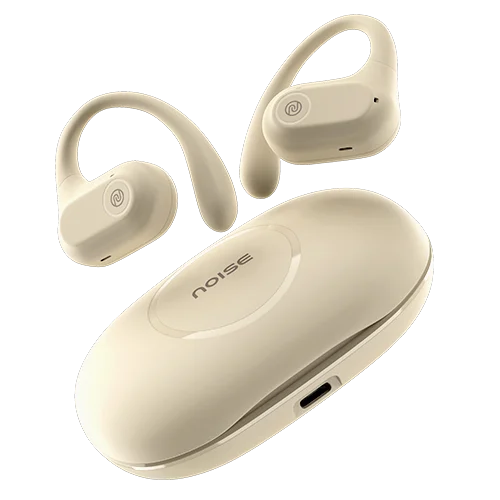
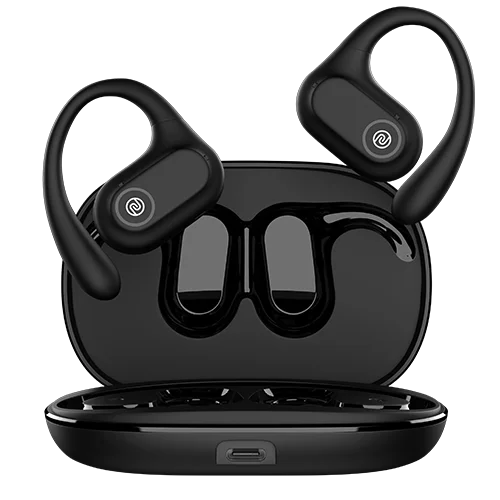
Elevate your auditory experience with our AirWave TechnologyTM, which uses an air-conduction system for seamless audio delivery. Never skip a beat with Noise Pure Pods' InstachargeTM feature, giving 180 minutes of playtime with just a 10-minute charge. Enjoy enhanced BT connectivity with BT V5.3.

Audio
  • Speaker driver: 16mm
Connectivity
  • BT: v5.3
  • Wireless range: 10m
  • Auto pairing: Yes, connects with the last paired device
  • BT supported profile: A2DP, AVRCP, HFP, SPP, AVDTP
  • Compatibility: Android & iOS
Battery & Charging
  • Playtime: Up to 80 hours at 60% volume 
  • Charging Time: Up to 60 mins
  • Fast Charging: Yes 
  • Charging Port: C-type
  • Charging Indicator: Yes
Physical Specification
  • Weight: 80 grams
  • Dimensions: 9.4 x 6.4 x 3 cm
  • Water resistance rating: IPX5
Additional Features
  • Instacharge™ : 10-min charge =180-min playtime
  • Hands-free calling: Yes
  • Voice assistant: Siri, Google Assistant
  • Dual device pairing: No

Frequently Asked Questions

Product Information

How do I control the earphones?

The control functions on the earphones are touch-enabled.

How is the calling quality?

Noise Pure Pods comes with Quad mic ENC which effectively cuts out disturbances, ensuring your voice is carried clearly. Call quality does depend on a good network and the amount of disturbances in the surroundings.

Does it announce the caller's name or number on incoming calls?
No, it doesn’t. You will get notifications for incoming calls through tone alerts on your earbuds.

Is Noise Pure Pods waterproof?

Noise Pure Pods come with an IPX5 rating which means that they are water-resistant. However, the earphones need to be completely dried before the next use.

Is noise cancellation available?

Yes, environmental noise cancellation is available during calls.

Compatibility

Are Noise Pure Pods compatible with iPhones?

Yes, they are compatible with iPhones.

Are Noise Pure Pods compatible with Android smartphones?

Yes, the earphones are compatible with Android smartphones.

Can Noise Pure Pods be connected to a laptop/computer?

Yes, they can be connected to the laptop/computer as long as it is equipped with BT connectivity.

Can Noise Pure Pods be connected to more than one device at a time?

No, Noise Pure Pods can only connect with one device at a time.

Do they support BT 4.0?

Noise Pure Pods is best suited with BT v5.3. However, they also support smartphones with BT v4.0.

What is the BT range of the phone?

The BT range is 10 metres without any obstacles.

Can I use Siri/Google Assistant?

Yes, you can use Siri & Google Assistant.

Battery & Charging

What is the battery backup?

The battery backup of the earphones is up to 80 hours.

How much time does it take to charge?

Noise Pure Pods take up to 90 minutes to fully charge.

In case the earphones are not charging, what do I do?

If you are not able to charge your earphones, you can reach out to us at the following link - https://www.gonoise.com/pages/register-your-complaint

How do I check the Noise Pure Pods battery level?

You can check the battery level of Noise Pure Pods on your smartphone. Go to the notification bar and look at the BT icon. The battery level is mentioned under it.

Can I charge Noise Pure Pods with my PC/laptop?

Yes, you can charge the Noise Pure Pods with your PC/laptop.

Do Noise Pure Pods have a fast-charging provision?

Yes, they have fast charging.

Getting Started

How do I turn the Noise Pure Pods on and off?
The earbuds will automatically turn on when you open the charging case and take the earbuds out, and will automatically turn off once placed inside the charging case with the lid closed.

How do I pair Noise Pure Pods with my smartphone?

Before pairing, make sure that your Noise Pure Pods and the mobile device are next to each other. Open the charging case and take out the earbuds from the charging case. Go to the BT menu on your phone. Search and select Noise Pure Pods to pair. Your Noise Pure Pods earphones are now ready to use.

Note: The earbuds will automatically connect to the last paired devices.

Where do I get the Pure Band?

The detachable Pure Band is a part of the contents of your Pure Pods box.

Troubleshooting

How do I reset Noise Pure Pods? 

To reset your earbuds make sure they are fully charged. On your paired devices, delete/remove Noise Pure Pods from the list of paired devices in the BT menu. 


Then take out the earbuds from the charging case and long-press both earbuds for 10 seconds, red and white LED lights will blink. Place the buds inside the charging case and repeat the pairing process.

Warranty & Registration

Is there a warranty for this product?
Yes, there is a 1-year manufacturing warranty from the date of delivery of the product.

Where do I register for the product warranty?
You can register your warranty at https://www.gonoise.com/pages/warranty-registration

Disclaimer

1. Prices are subject to change without prior notice. (Special discount prices are valid for a limited period)

2. The quality of bass and loudness is subjective and may vary from person to person.

3. 80 hours of playtime depends on factors such as music genre, and sound volume.

4. The earbuds have an IPX5 water-resistant rating. However, the earbuds need to be dried completely before the next usage.

5. Actual products may differ slightly in appearance from the illustrations/pictures provided.