Product Information

Package Contains: 1 device, 1 charging cable, 1 user manual, warranty card.

Download Manual

Product Description

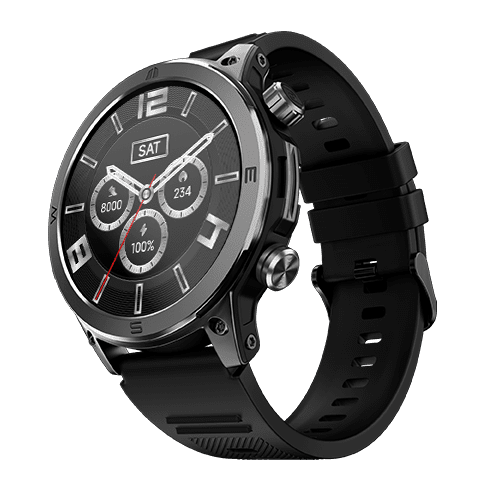
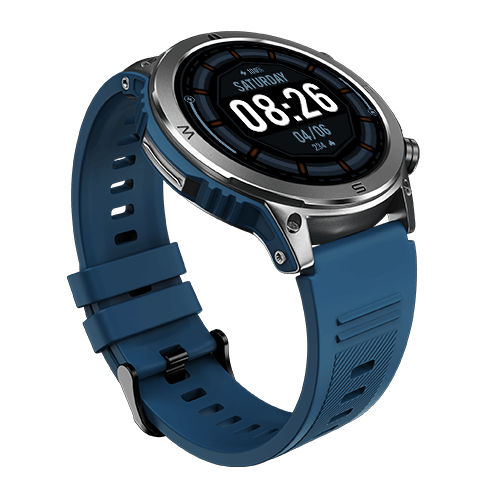
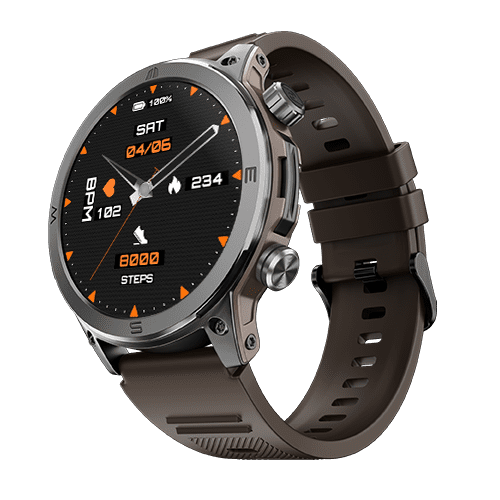
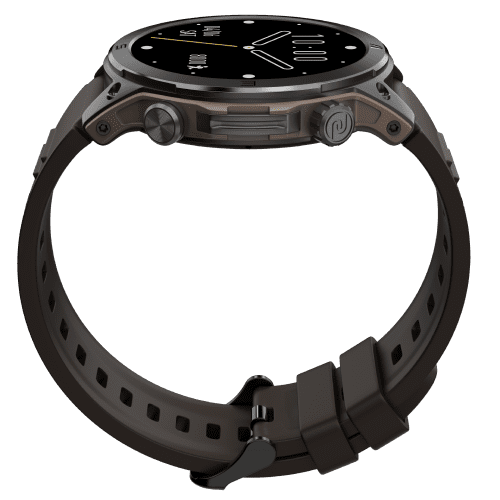
Boasting a vibrant 1.46" Always On AMOLED display that delivers crystal-clear visuals NoiseFit Endeavour is equipped with SoS Technology, your safety is just a tap away during emergencies. Keep a close eye on your well-being with Rapid Health measurement, allowing you to proactively address any health concerns. The user-friendly functional crown ensures effortless navigation and control, enhancing your overall experience.

With the Noise Health Suite™, this smartwatch surpasses mere fitness tracking, providing comprehensive health insights. Customise your device with a choice of 100+ watch faces, and with 100+ sports modes, it caters to a wide range of fitness routines. Count on its reliable battery life of up to 7 days, minimising the need for frequent charging interruptions. Embrace a fusion of innovation and style with a device meticulously crafted to complement your daily activities.

Connectivity
  • System Requirement: iOS 11.0 + or Android 9.0 +
  • BT: v5.3
Sensors
  • Heart rate sensor: Yes
  • Accelerometer: Yes
  • SpO2 sensor: Yes
Physical Specification
  • Watch Case Material: Metal
  • Strap Size & Material: 22mm (silicone, leather & metallic chain)
  • Water Resistance Rating: IP68
Smart Features
  • SoS technology
  • Caller name information
  • Call rejection
  • Stopwatch
  • Timer
  • Alarm
  • Reminder
  • Weather
  • Vibration alert
  • Do not disturb mode
  • Screen brightness
  • Functional crown
  • Wrist awake
Display
  • Display technology: AMOLED
  • Size: 1.46”
  • Resolution: 466*466
  • Cloud-based watch faces: Yes
Battery & Charging
  • Typical Usage Time: 7 days
  • Standby Time: 30 days
  • Charging Time: Up to 2 hours
  • Charging Cable: Yes
Health Monitoring Features
  • Heart rate monitor
  • SpO2 monitor
  • Step tracker
  • Activity history
  • Sleep monitor
  • Breathe practice
  • Stress measurement
  • Female cycle tracker
  • Sports modes

Frequently Asked Questions

Product Information

Does NoiseFit Endeavour have a full touchscreen display?

Yes, NoiseFit Endeavour features a full-touch 1.46” AMOLED display.

Is NoiseFit Endeavour shockproof?

No, NoiseFit Endeavour is not shockproof. Please avoid dropping it from a height as the watch may get damaged.

Is NoiseFit Endeavour waterproof?

Yes. NoiseFit Endeavour has an IP68 rating. It can go underwater up to a depth of 1.5m for up to 30 minutes. However, avoid saunas, hot water and ocean water.

Can NoiseFit Endeavour be used while swimming?

You cannot wear it while swimming.

What is the pixel resolution of my NoiseFit Endeavour?

The display resolution of NoiseFit Endeavour is 466*466.

What notifications can I get on my NoiseFit Endeavour?

You get notifications for SMS, calls, WhatsApp, LinkedIn, Instagram, FB messenger, Skype, Twitter, Facebook, YouTube, Gmail, Outlook, Snapchat, and Telegram, as long as the notification feature is turned on and your phone and smartwatch are in BT range and in sync.

Does NoiseFit Endeavour come with a calling feature?

Yes, NoiseFit Endeavour comes with BT calling.

Does NoiseFit Endeavour have voice assistance?

No, NoiseFit Endeavour does not come with voice assistance.

Does NoiseFit Endeavour come with in-built games?

No, NoiseFit Endeavour does not come with in-built games.

Does it have a phone tracking option?

Yes, the NoiseFit Endeavour comes with a phone tracking option. 

Does NoiseFit Endeavour have Gesture control?

Yes, the NoiseFit Endeavour comes with gesture controls. 

Can I reduce the vibration level in my NoiseFit Endeavour?

Yes, you can control the vibration in NoiseFit Endeavour.

Can NoiseFit Endeavour store and play music?

No, the NoiseFit Endeavour cannot store and play music. 

Can I use my earbuds and my NoiseFit Endeavour at a time with the same smartphone?

Yes, both earbuds and NoiseFit Endeavour can be paired with your smartphone at the same time.

What is the BT range of NoiseFit Endeavour?

The BT range of NoiseFit Endeavour is 18 meters. 

Can it play music to a BT headset?

No, NoiseFit Endeavour cannot play music to a BT headset.

How many watch faces does NoiseFit Endeavour have?

NoiseFit Endeavour comes with 100+ watch faces which you can access and customise via the NoiseFit app.

Can we change the watch face?

Yes, you can change the watch faces. From the watch, touch and hold the home screen. Swipe and choose from the watch faces. From the app, go to the watch face, select the watch face of your choice and tap Save to change the watch face. You can even customise your watch face from the app.

How do I increase the brightness of my NoiseFit Endeavour?

You can set the brightness from the watch. Turn on the watch screen, swipe up from the home screen, select Brightness and adjust it as per your convenience.

What sensors does the NoiseFit Endeavour have?

NoiseFit Endeavour features HR sensor, Accelerometer and SpO2 sensor.

Does NoiseFit Endeavour have GPS?

No, NoiseFit Endeavour does not have GPS.

What are the accessories included with NoiseFit Endeavour?

NoiseFit Endeavour comes with one user manual and magnetic charging cable.

Getting Started

How do I set up my NoiseFit Endeavour device?

Before setting up make sure that your smartphone and NoiseFit Endeavour are charged and next to each other. Connect the charging cable to turn on the watch. Download the NoiseFit app on your smartphone. Open the NoiseFit app and allow the BT and GPS positioning to be turned on. Feed in your personal information and health goals in the app. Go to the add device page in the app and select the device type and link the watch. See how it's done in this video here.

Why won't my NoiseFit Endeavour device sync?

This may be because it lost BT connectivity with your smartphone. For a stable connection, please ensure that the NoiseFit app is running and locked in the background.

Why can't I set up my NoiseFit Endeavour device?

Reset your NoiseFit Endeavour and try again.

Why didn't my NoiseFit Endeavour device alert me?

Possibly due to BT connectivity loss. Ensure that your watch & phone are within BT range with alerts turned on in the App, which is kept running & locked in the background (Android). Also check if the DND is turned off or not.

How do I restart my NoiseFit Endeavour?

You can restart your NoiseFit Endeavour smartwatch by following these steps. Turn on the watch screen. Swipe up to go to Settings. Select Reboot and choose to restart.

How do I turn off my NoiseFit Endeavour?

Turn on the watch screen. Swipe up to go to Settings. Select Power Off and choose to power off.

How do I reset my NoiseFit Endeavour?

You can reset NoiseFit Endeavour from the watch. From the home screen, swipe up to go to Settings. Select Reset and choose to reset.

Battery & Charging

What is the battery life and standby time?

The smartwatch offers up to 7-day battery life & 30-day standby. Standby time is the maximum tested time that a single charge will last when the smartwatch is used as a regular watch.

How do I know when my device is charged?

NoiseFit Endeavour takes approximately 2 hours to charge completely. It will display a 100% Charged message once the battery is at full capacity.

How do I check the battery level on my NoiseFit Endeavour device?

Turn on the screen and swipe up to check the battery level on your NoiseFit Endeavour.

How can I extend my NoiseFit Endeavour device's battery life?

You can extend the battery life in your device by turning down the brightness level and turning off the All-day Heart Rate measurement.

Which adapter should I use to charge my NoiseFit Endeavour?

Please use a low power adapter or you can plug in the charging cable into a laptop or PC USB port. Do not use a fast charging adapter as it may damage the watch in the long run.

App

What's the name of the app?

The name of the app is NoiseFit app.

How do I manage my NoiseFit profile?

You can manage the NoiseFit profile from the app. Open the App, go to My device and choose Device setting to manage your profile.

How do I track my workouts with my NoiseFit app?

You can track your workout on the Home section of the app. Open the NoiseFit app. Go to the Daily Report section of the Home page and get your daily report.

How do I change the units of measurement on my NoiseFit Endeavour device?

You cannot change the units of measurement on your NoiseFit app once set.

Syncing

How does NoiseFit Endeavour sync data?

NoiseFit Endeavour syncs data over a BT connection with NoiseFit app.

Alerts & Notifications

Does NoiseFit Endeavour show notifications from social networking apps?

NoiseFit Endeavour shows push notifications from social networking apps that have been synced with the NoiseFit app. Please ensure that the NoiseFit app is running and locked in the background (Android).

Why isn't NoiseFit Endeavour receiving notifications from my phone?

Possibly due to BT connectivity loss. Ensure that your watch & phone are within BT range with the alerts turned on in the app, which is kept running & locked in the background (Android). Make sure that the DND in the smartwatch is turned off. 

Can we see messages and caller info from my phone on the smartwatch?

Yes, you can see messages and caller information on your smartwatch as long as the watch is synced with the NoiseFit app and is within BT range.

How can we see the caller information?

Turn on the call notification feature on the NoiseFit app to see incoming call information.

Can I read incoming messages on my NoiseFit Endeavour or will I only receive message notifications?

You will be notified of new messages on your NoiseFit Endeavour once it is connected with the NoiseFit app. You can read the message at the time you receive a notification. You also have the option to see previously received notifications.

Health Features

Does NoiseFit Endeavour have female health tracking?

Yes, NoiseFit Endeavour offers female health tracking.

What is the function of SpO2?

SpO2 monitor measures the oxygen level in your blood.

How does NoiseFit Endeavour estimate how many calories I've burned?

NoiseFit Endeavour estimates the number of calories burned based on your heart rate, activity duration, steps taken, distance covered, height, weight and age.

How do I track my heart rate with my NoiseFit Endeavour?

NoiseFit Endeavour can detect heart rate both manually or automatically. You can track your heart rate with the NoiseFit app.

Why don't I see my heart rate on my NoiseFit Endeavour?

You can see heart rate on your NoiseFit Endeavour smartwatch provided you are wearing it on your wrist and there is no space between the watch and wrist. For detailed analysis, you can check the NoiseFit app.

Does this watch synchronize sleep if the app is not connected?

Yes, NoiseFit Endeavour will measure your sleep even if not connected with the app. The data will be synced to the app, once connected. You can also view your daily sleep data on your smartwatch.

Does it have a Pedometer?

Yes, NoiseFit Endeavour comes with an in-built pedometer.

Compatibility

Is NoiseFit Endeavour compatible with the iPhone?

NoiseFit Endeavour is compatible with all iPhones running on iOS 11.0 and above.

Is NoiseFit Endeavour compatible with Android?

NoiseFit Endeavour is compatible with all Android phones running on Android version 9.0 and above.

Straps

What is the NoiseFit Endeavour strap size?

The width of the strap is 22 mm. 

How do I change the wristband on my NoiseFit Endeavour device?

The mechanism to remove and replace the band can be found on the underside of the watchband.

From where can I purchase a replacement strap?

You can purchase replacement straps from our official website.

Warranty & Registration

Is there a warranty for this product?
Yes, there is a 1-year manufacturing warranty from the date of delivery of the product.

Where do I register for the product warranty?
You can register your warranty at https://www.gonoise.com/pages/warranty-registration

Disclaimer

1. NoiseFit Endeavour is meant for only general wellness and fitness purposes and not for medical purposes.

2. NoiseFit Endeavour has an IP68 rating and is not suitable for diving or high-pressure water activities. Devices backed by an international standard rating of IP68 are deemed fit enough to withstand dust, dirt and sand, and are resistant to submersion up to a maximum depth of 1.5m underwater for up to thirty minutes. It can be used in the shower. However, do avoid sauna, hot water bath and ocean water as the moisture and salty water can damage the band. If the device or your hands are wet, they must be dried thoroughly prior to handling.

3. To get the best user experience of NoiseFit Endeavour, sync it with the NoiseFit app after pairing it with your compatible smartphone.

4. Battery life varies with use and other factors.

5. NoiseFit Endeavour takes approx. 2 hours to charge.

6. 24/7 Heart rate monitor tracks your heart rate at an interval of 5 minutes.

7. The actual product may differ slightly in appearance to illustrations/pictures provided.